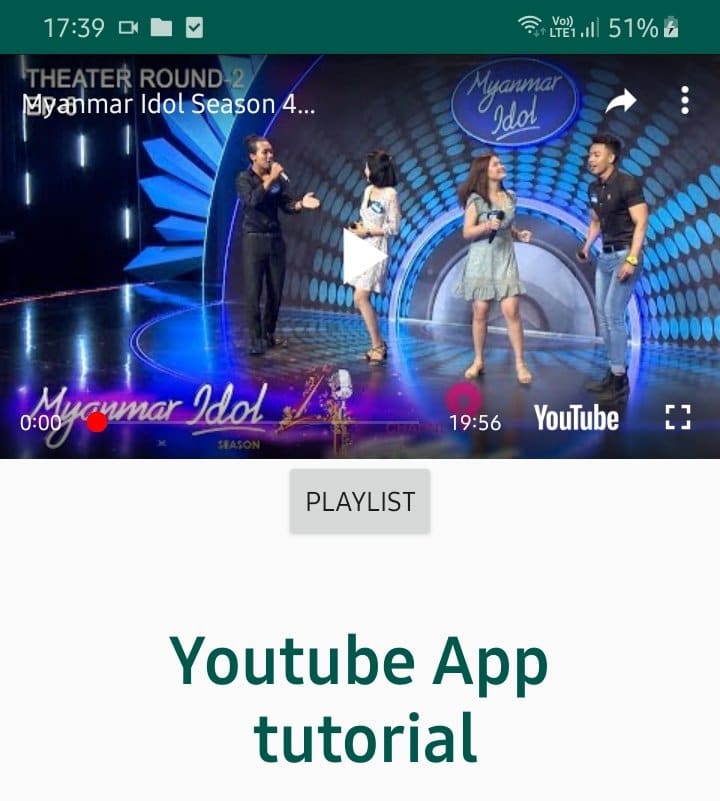
In this tutorial we will make youtube app, that can play our video and playlist video.
Open Android Studio and create a new project with empty activity.
Now download Youtube Android Player API, and then extract the downloaded compressed folder, and add to the libs folder in android studio.
Add dependencies to build.gradle file and sync.
implementation files('libs/YouTubeAndroidPlayerApi.jar')


You need to add Google API Key. ( if you can not do , pls follow the video.)
you need to add Video ID and

Playlist ID also. 
AndroidManifest.xml
Add internet permission.

<?xml version="1.0" encoding="utf-8"?>
<manifest xmlns:android="http://schemas.android.com/apk/res/android"
    package="com.dammang.youtubeapp">
    <uses-permission android:name="android.permission.INTERNET"/>

    <application
        android:allowBackup="true"
        android:icon="@mipmap/ic_launcher"
        android:label="@string/app_name"
        android:roundIcon="@mipmap/ic_launcher_round"
        android:supportsRtl="true"
        android:theme="@style/AppTheme">
        <activity android:name=".MainActivity">
            <intent-filter>
                <action android:name="android.intent.action.MAIN" />

                <category android:name="android.intent.category.LAUNCHER" />
            </intent-filter>
        </activity>
    </application>

</manifest>
Add this youtube player view in
activity_main.xml
<?xml version="1.0" encoding="utf-8"?>
<LinearLayout xmlns:android="http://schemas.android.com/apk/res/android"
xmlns:app="http://schemas.android.com/apk/res-auto"
xmlns:tools="http://schemas.android.com/tools"
android:layout_width="match_parent"
android:layout_height="match_parent"
android:orientation="vertical"
tools:context=".MainActivity">
<com.google.android.youtube.player.YouTubePlayerView
android:id="@+id/youtube_player"
android:layout_width="match_parent"
android:layout_height="wrap_content"
android:background="@android:color/white">
</com.google.android.youtube.player.YouTubePlayerView>
<Button
android:id="@+id/btnPlist"
android:layout_width="wrap_content"
android:layout_height="wrap_content"
android:layout_gravity="center"
android:text="playlist"/>
<TextView
android:textColor="@color/colorPrimaryDark"
android:layout_marginTop="40dp"
android:textSize="35sp"
android:layout_gravity="center"
android:gravity="center"
android:textStyle="bold"
android:text="Youtube App\n tutorial"
android:layout_width="wrap_content"
android:layout_height="wrap_content"/>
</LinearLayout>MainActivity.java
package com.dammang.youtubeapp;

import androidx.appcompat.app.AppCompatActivity;

import android.content.Intent;
import android.os.Bundle;
import android.view.View;
import android.widget.Button;

import com.google.android.youtube.player.YouTubeBaseActivity;
import com.google.android.youtube.player.YouTubeInitializationResult;
import com.google.android.youtube.player.YouTubePlayer;
import com.google.android.youtube.player.YouTubePlayerView;

import java.util.PrimitiveIterator;

public class MainActivity extends YouTubeBaseActivity implements YouTubePlayer.OnInitializedListener {

    private String GOOGLE_API_KEY = "Your Google Api Key";
    private String YOUTUBE_VIDEO_ID = "zGED0LioCHo";
private String YOUTUBE_PLAYLIST_ID= "PLlwJ5OBv7YUjmA5dKBOVeXFjjca940qMc";

    @Override
    protected void onCreate(Bundle savedInstanceState) {
        super.onCreate(savedInstanceState);
        setContentView(R.layout.activity_main);
        YouTubePlayerView youTubePlayerView = (YouTubePlayerView) findViewById(R.id.youtube_player);
        youTubePlayerView.initialize(GOOGLE_API_KEY, this);

Button button = (Button)findViewById(R.id.btnPlist);
button.setOnClickListener(new View.OnClickListener() {
    @Override
    public void onClick(View view) {
        Intent intent = YouTubeStandalonePlayer.createPlaylistIntent(MainActivity.this,GOOGLE_API_KEY,YOUTUBE_PLAYLIST_ID);
        startActivity(intent);
    }
});

    }

    @Override
    public void onInitializationSuccess(YouTubePlayer.Provider provider, YouTubePlayer youTubePlayer, boolean b) {

        youTubePlayer.setPlayerStateChangeListener(playerStateChangeListener);
        youTubePlayer.setPlaybackEventListener(playbackEventListener);


        if(!b) {
            youTubePlayer.cueVideo(YOUTUBE_VIDEO_ID);
        }
    }


    private YouTubePlayer.PlaybackEventListener playbackEventListener = new YouTubePlayer.PlaybackEventListener() {
        @Override
        public void onPlaying() {

        }

        @Override
        public void onPaused() {

        }

        @Override
        public void onStopped() {

        }

        @Override
        public void onBuffering(boolean b) {

        }

        @Override
        public void onSeekTo(int i) {

        }
    };

    private YouTubePlayer.PlayerStateChangeListener playerStateChangeListener = new YouTubePlayer.PlayerStateChangeListener() {
        @Override
        public void onLoading() {

        }

        @Override
        public void onLoaded(String s) {

        }

        @Override
        public void onAdStarted() {

        }

        @Override
        public void onVideoStarted() {

        }

        @Override
        public void onVideoEnded() {

        }

        @Override
        public void onError(YouTubePlayer.ErrorReason errorReason) {

        }
    };


    @Override
    public void onInitializationFailure(YouTubePlayer.Provider provider, YouTubeInitializationResult youTubeInitializationResult) {

    }
}
Now Run your App.
Finish. good luck.


